Under-Cabinet Lighting for Renters: Rechargeable vs. Plug-In
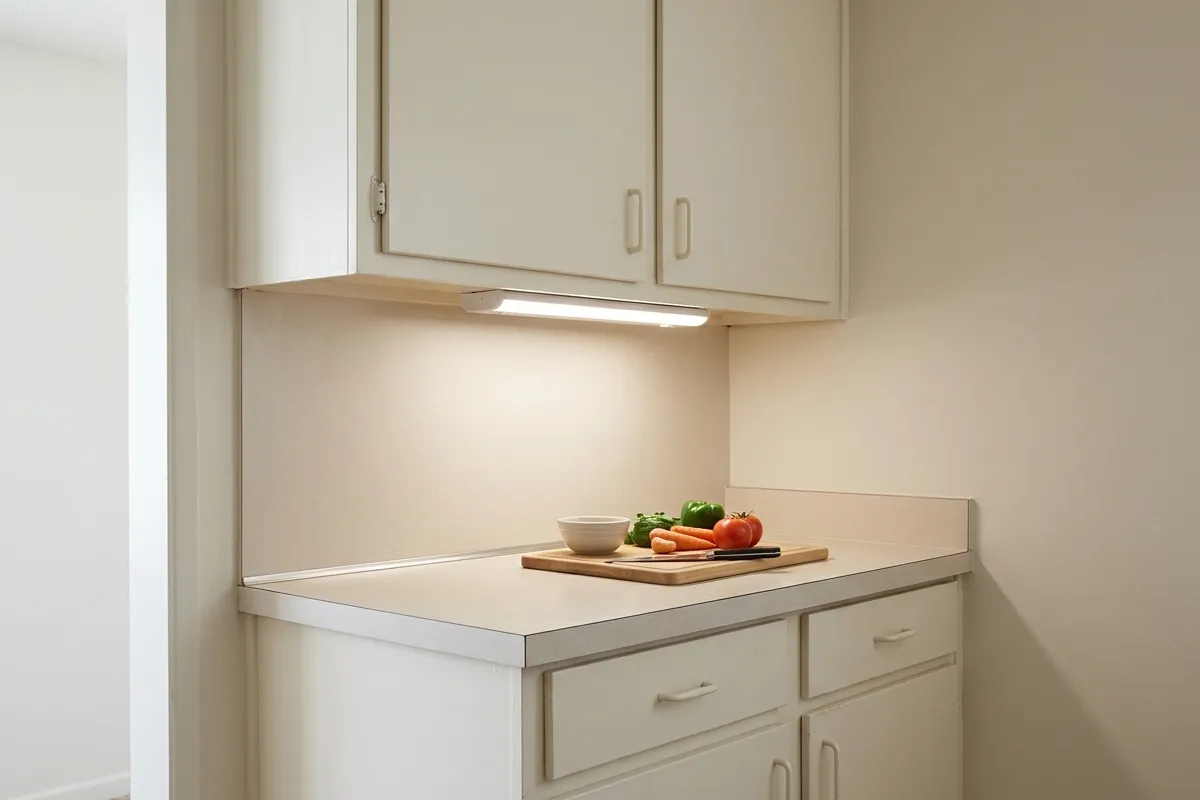
Before buying under-cabinet lighting, picture how you will use it: preparing dinner, reaching for a mug, or illuminating a counter the ceiling light leaves in shadow. Those uses ask different things of a fixture.
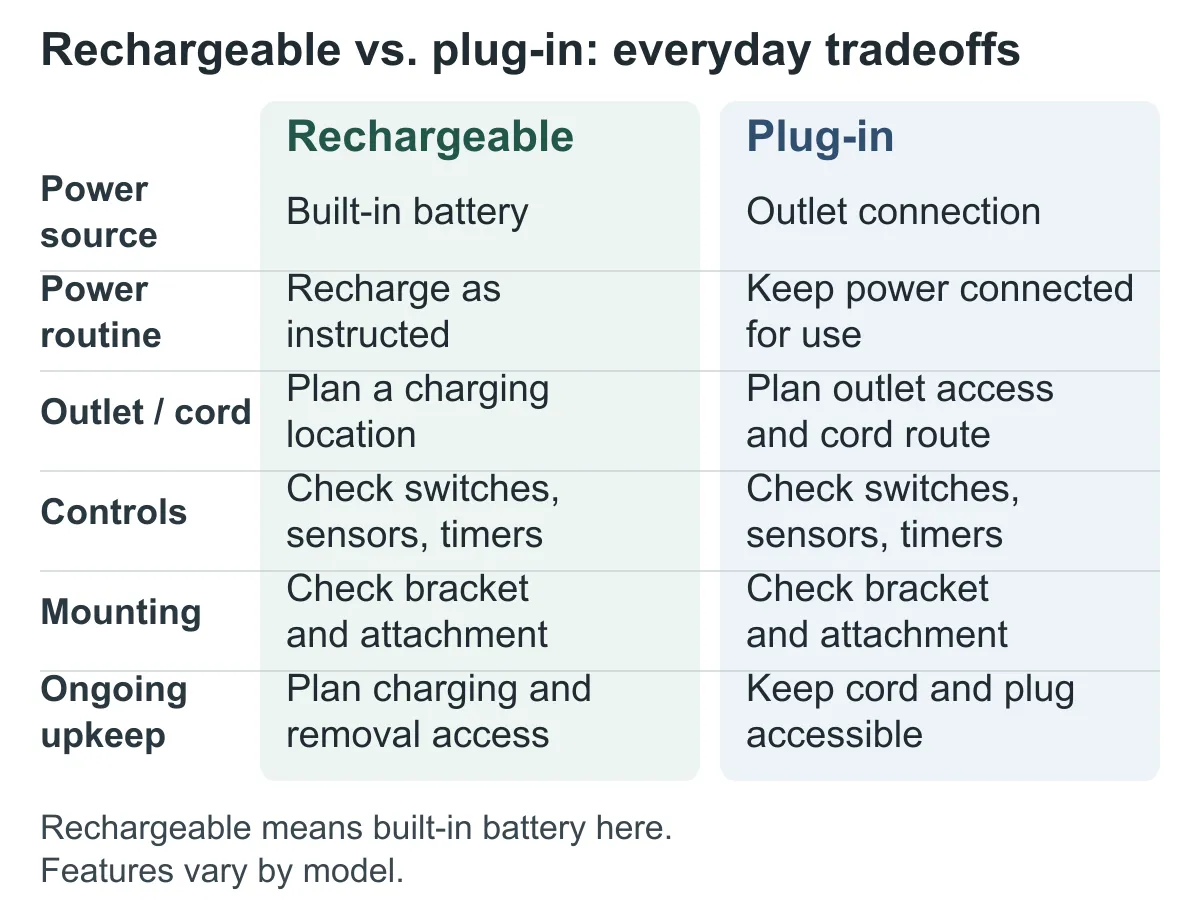
A rechargeable bar needs a manageable charging routine. A plug-in fixture needs an accessible outlet and a workable cord route. Both need suitable mounting, useful controls, and dimensions that fit your cabinets.
Start with the location and how long you expect to leave the light on. Then compare models against those requirements.
Separate rechargeable, replaceable-battery, and plug-in lights
“Battery-powered” can describe two different purchases.
A light with a built-in rechargeable battery needs charging through its specified connection. Find out whether you remove the fixture, charge a separate battery pack, or connect a cable in place. A rechargeable battery is not necessarily replaceable.
A replaceable-battery light uses the battery size and type specified for that model. Its routine involves opening a compartment and replacing batteries rather than connecting the fixture to a charger. If you want to use rechargeable AA or AAA cells, confirm that the instructions allow them.
A plug-in light operates through its specified power connection to an outlet or power supply. The purchase may include the necessary power supply, or you may need to obtain it separately.
The main comparison here is rechargeable versus plug-in under-cabinet lighting. Keep replaceable-battery models distinct when reading listings so that “wireless” does not hide a maintenance routine you would rather avoid.
Check the outlet route and charging routine
For a plug-in candidate, trace the proposed route from the fixture’s connection to the outlet. Include bends around the cabinet, connector space, and access to the plug. A nearby outlet is not enough if the supplied cable cannot reach it along a suitable route.
For example, Jasco lists a 5-foot power cord and an 18-inch linking cord with the UltraPro 44105. Those lengths belong to that model’s purchase; they are not standard lengths for plug-in lighting. UltraPro 44105 product details.
Consider whether the plug would occupy an outlet you regularly need for another appliance. Read the fixture’s cord-routing and location restrictions before settling on its position. Hiding a cord inside cabinetry or passing it through a permanent structure is not automatically an available option.
For a rechargeable candidate, identify the charging location instead. Can you reach and remove the light comfortably? Where will it sit while charging? Will the required power source be available?
If several bars need charging, consider the whole routine. An arrangement that works well for one fixture may feel different when you must take down and reconnect several. Find out whether the model permits operation while connected for charging; a charging port alone does not establish that capability.
Read runtime claims in the correct mode
A runtime expressed in hours and a claim expressed in months may describe very different patterns of use.
Continuous runtime concerns a light left on. Motion-activated duration may assume short activations separated by long periods with the light off. Before comparing either figure, look for the brightness setting, operating mode, and conditions attached to it.
Good Earth’s manual for RE1250-WHG-12LFR-G states approximately 3.6 hours of continuous operation and 4.5 hours of recharge time. It also gives approximately 2.7 months of motion-activated use, based on eight 20-second activations per day. The duration estimates refer to the first full charge. Good Earth charging and operating instructions, pages 1–3.
That months-long estimate does not describe leaving the light on throughout meal preparation. It illustrates why the operating assumptions matter as much as the headline figure.
For your shortlist, record the stated mode beside each runtime. If the conditions are missing, leave the comparison unresolved rather than converting the claim into “charge once a week.”
Your own requirement can remain simple: describe a usual session and how often it happens. Use that pattern to assess the manufacturer’s information, without treating an estimate as a guaranteed charging schedule.
Compare output, light color, and controls separately
Lumens describe the amount of light a fixture emits. Before comparing figures, establish whether each applies to one light or a whole set, and which setting it describes. The power source is not a substitute for an output specification.
For example, Feit’s specification sheet lists 370 lumens for UCL16.5/840/BAT. That figure applies to this fixture, not rechargeable lighting generally. It also does not establish whether the light will adequately illuminate your particular counter. Feit light-output specifications.
Color temperature, sometimes labeled CCT, describes the light’s color appearance and is expressed in kelvins, or K. It is separate from lumen output. The same Feit sheet lists 4000K. For other candidates, distinguish a fixed color temperature from selectable settings.
Consider controls alongside those specifications. Can you reach the switch beneath the cabinet lip? Does the light have a continuous-on mode? If it uses a motion sensor, what turns it on and how soon does it switch off?
For the Energizer/Jasco 87627, the manufacturer lists ON, motion-sensing, and OFF modes, plus dimming. Its stated motion-mode shutoff occurs 30 seconds after motion stops. Consider whether that behavior suits your intended activity. Energizer 87627 controls and features.
Onboard dimming does not, by itself, establish compatibility with an external dimmer.
Measure the usable cabinet space
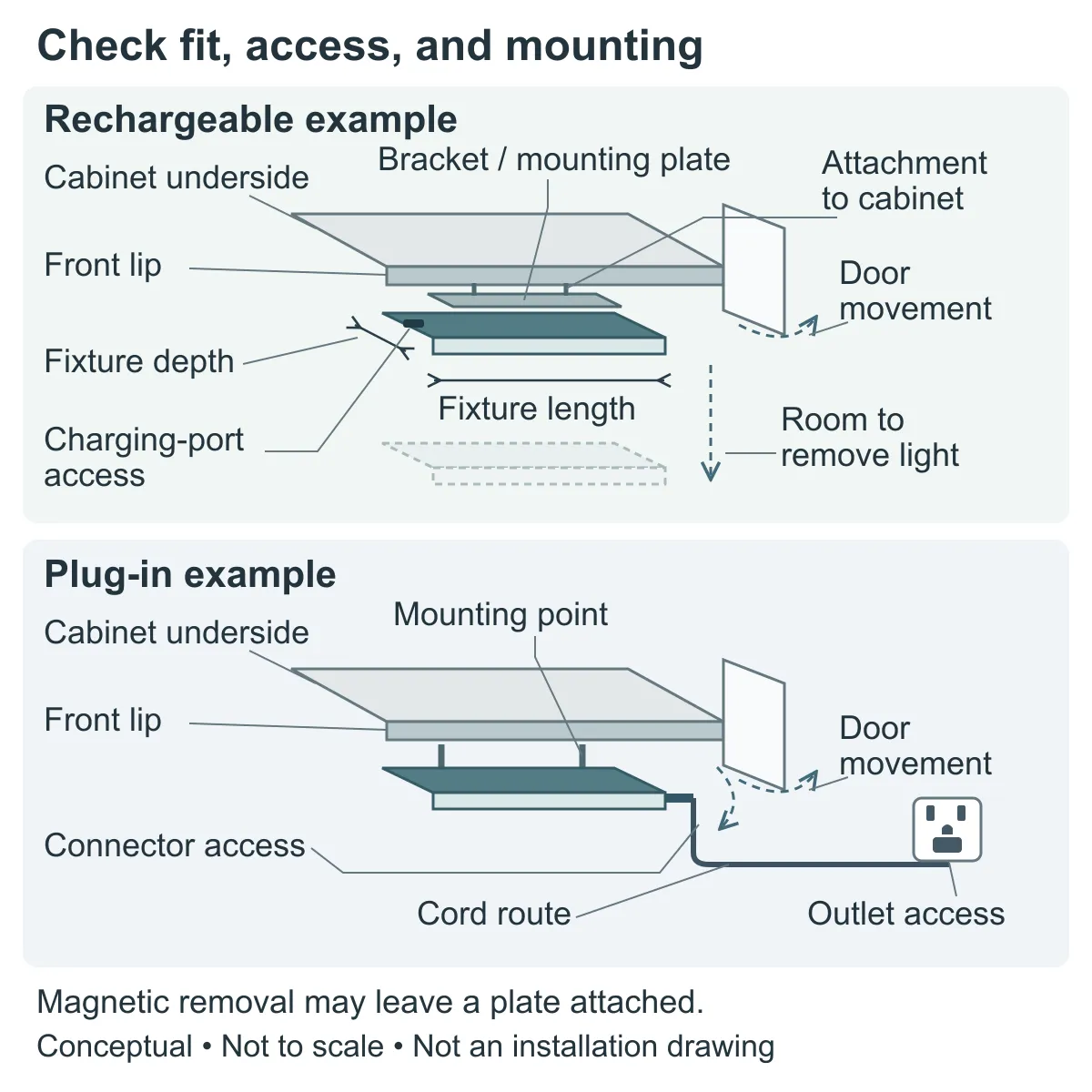
Measure the underside area where the fixture would actually sit. Record length, width, and downward projection, including the mounting arrangement. A nominal bar length does not answer all three questions.
Then allow for the parts you need to reach or move: a switch, charging port, cable connector, battery cover, or the fixture itself when removing it. The cabinet lip should not prevent the access your chosen light needs.
For linked fixtures, include the connector and linking-cord arrangement between bars. For rechargeable lights, consider the removal movement with nearby items and cabinet doors in mind.
If placement creates a door or access conflict, work through checking doors, drawers, and everyday kitchen access before ordering.
“Under-cabinet” also does not mean suitable for every location beneath a cabinet. Read the manufacturer’s restrictions for placement near sinks, cooktops, and heat-producing appliances. Leave an unsuitable location off the shortlist.
Understand what attaches to the cabinet
Look at the complete mounting system, including the part left behind when you remove the light.
With magnetic mounting, the fixture may attach to a separate plate that is itself fixed to the cabinet. Feit describes this arrangement for UCL16.5/840/BAT: the light attaches magnetically to an adhesive-mounted bracket and can be removed for charging. Removing the light does not remove that bracket. Feit mounting and charging details.
With adhesive mounting, identify the adhesive system, suitable surfaces, preparation requirements, and removal instructions. Substituting generic tape—or borrowing another product’s removal method—requires compatibility information, not just a similar appearance.
With screw mounting, include the proposed attachment and the holes it would leave in your decision. A mounting option supplied in the box is not automatically appropriate for your cabinet or rental arrangement.
Keep routine removal for charging separate from eventual removal when you move. Adhesive mounting does not guarantee that a finish will remain unchanged. If the instructions leave removal or surface suitability unclear, ask the manufacturer before treating the product as a workable option.
Check what the purchase includes
Compare the package contents against everything needed for your planned arrangement.
The Energizer/Jasco 87627 listing specifies an included 1.5-foot USB charging cable, used with a USB-A power source, but excludes the adapter. A charging cable therefore does not necessarily complete the charging setup. Energizer package contents.
For each candidate, check:
- The number of fixtures in the pack.
- The required power supply or charger, and whether it is included.
- Supplied cables and their lengths.
- Mounting plates, brackets, strips, screws, or other specified hardware.
- Linking connectors needed for your arrangement.
- Remote controls and any batteries they require.
Match the model and package version before comparing offers. A compatible accessory is not necessarily included, and an included accessory may not meet the needs of your particular layout.
Keep missing components on the shopping list until you have identified the appropriate version. A spare charger or linking cable is useful only if it meets the fixture’s requirements.
Count the complete purchase
Build a total for the lighting arrangement you intend to use, rather than comparing the price of one bar with a multi-light pack.
Include the required fixture quantity, any missing compatible charger or connectors, suitable mounting supplies, shipping, and tax. Record supplies you already own separately so you can confirm their compatibility rather than silently treating them as available.
Keep ongoing costs and routines visible too. Depending on the setup, these may include replacement batteries, electricity, or replacement mounting materials. Leave savings figures out unless you have a supported basis for comparing the alternatives.
If an accessory or mounting requirement remains unknown, mark it as unresolved. An incomplete total should not decide the purchase.
Use budget small kitchen makeover planning to weigh the finished lighting proposal against other improvements you are considering.
Match the arrangement to your kitchen
Use this comparison once you have reviewed the requirements for the models on your shortlist.
| Situation | Direction to investigate | What still needs to be established |
|---|---|---|
| No workable outlet route reaches the intended position, but charging elsewhere is manageable | Rechargeable may fit better | Runtime conditions, charging requirements, mounting suitability, and removal access |
| A suitable outlet and workable cord route are available, and you want to avoid a battery-servicing routine | Plug-in may fit better | Cord reach, connector space, location restrictions, controls, and mounting |
| The light is mainly for brief visits to a cabinet or counter | A rechargeable sensor model may fit | Whether its activation behavior and timeout match that use |
| You expect sustained lighting during longer kitchen sessions | Compare continuous-operation arrangements carefully | Qualified battery runtime or a workable plug-in setup; output information relevant to the intended use |
| Surface, permission, fit, or essential specifications remain unclear | Delay the purchase | Resolve the missing information before treating either option as suitable |
Keep the rental check specific to this purchase
Record the proposed light, exact location, attachment method, cord route, and eventual removal plan. Check how your rental agreement addresses the proposed change and clarify anything uncertain with the landlord or property manager.
For broader questions about surfaces, permission, and removal, use renter-friendly small kitchen upgrades. The lighting manufacturer’s mounting instructions do not settle what your rental allows.
If neither arrangement fits the available space or constraints, small kitchen improvements without renovation offers a way to reconsider the task using what you already have.
The useful choice is one you can picture living with: a light in the right place, controls within reach, and either a workable cord route or a charging routine you are comfortable with. Include the mounting and complete purchase requirements in that picture. If an essential detail is still unclear, there is no need to settle the decision yet.